Programmatically Hide Empty Columns
Last updated: April 21, 2025
If you have a large number of columns in your schema that may not be used every import, hiding the additional columns is a good way to ensure your users don't have a cluttered view and can see the columns they need to be editing quickly.
They can hide all empty columns themselves with the options on the Review Table:
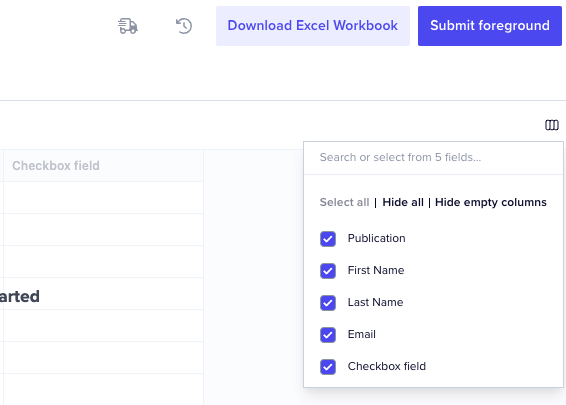
But you may want to hide these programmatically to save them a step. Below is a code example of a job that could be used to hide empty columns for your users. Please note this example is intended to be used with our Job Handler plugin.
/**

* The CondenseField Job is a custom job with the following responsibility: *

* 1. For every field in the sheet, verify if it meets any of the following checks

* - Is the field required

* - Does the field have any validation errors

* - Does the field have any data

* 2. Any fields that do not meet any of the expected criteria are hidden */


//In your listener, add:

   listener.on("job:completed", { job: "workbook:map" }, async (event) => {


      const context = event.context

      const jobId = context.jobId


      const jobResponse = await api.jobs.get(jobId)

      const sheetConfig = jobResponse.data.config

      //@ts-ignore

      const sheetId = sheetConfig.destinationSheetId


      api.jobs.create({

        type: "sheet",

        operation: "condense-fields",

        source: sheetId,

        trigger: "immediate",

      })

    })


   listener.use(jobHandler("sheet:condense-fields", async ({ context }, tick) => {

 try {

  const { data } = await api.sheets.get(context.sheetId)

  const { data: counts } = await api.sheets.getRecordCounts(context.sheetId, { byField: true })


  await tick(50, "Checking fields to hide...")


  const fieldsToHide = data.config.fields.reduce((acc, field) => {

   const isRequired = field?.constraints?.some((constraint) => constraint.type === "required") ?? false

   const isInvalid = counts.counts.errorsByField?.[field.key] > 0

   const hasData = counts.counts.byField?.[field.key]?.total !== counts.counts.byField?.[field.key]?.empty


   // Fields which do not meet any criteria should be hidden

   if (!isRequired && !isInvalid && !hasData) {

    acc.push(field.key)

   }

   return acc

  }, [])

  return {

   outcome: {

    message: "All empty fields that are neither required nor invalids have been successfully hidden!",

    acknowledge: true,

    hideDefaultButton: true,

    next: {

     type: "view",

     hiddenColumns: fieldsToHide,

     sheetId: context.sheetId,

    },

   },

  }

 } catch (error) {

  throw new Error(`Failed to condense sheet view: ${context.sheetId} | ${error}`)

 }

})
This uses the hiddenColumns parameter that is available when using the job outcome to navigate the user to a specific view.